For product teams
Run a whole product launch on one canvas
Development, code freeze, billing, permits and store approval on one timeline, so nothing blocks launch day by surprise.
7 min read
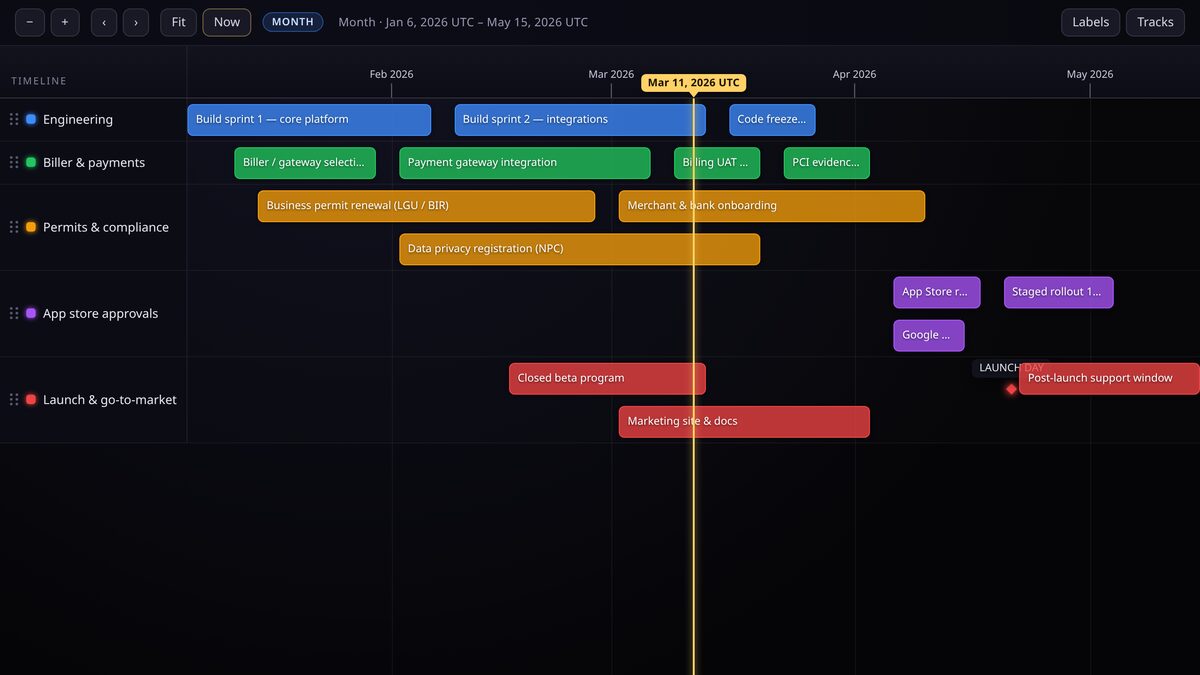
A launch slips when a dependency nobody was watching lands late. A single timeline puts every workstream, from code freeze to business permits to app-store review, on the same axis, so the critical path is visible instead of implied.
Tracks are workstreams
- Engineering, feature work, integration and hardening.
- Code freeze and release candidate, the gates that protect quality.
- Billing and payments, provider integration and test transactions.
- Compliance, business permits, tax and legal sign-off.
- Distribution, app-store submission and review.
- Marketing, announcement, press and launch-day assets.
Hard dates versus target dates
Not every date carries the same weight. Show the difference with event types and importance rather than a colour buried in a note.
- A milestone is a point event, for example launch day, code freeze or submission.
- A window is a range, for example public beta from March to April.
- Mark the launch itself and external deadlines with top importance so they stay prominent when zoomed out.
- Use "ongoing" for anything that has no planned end, such as post-launch support.
Read the dependencies left to right
Once every stream is on the canvas, the critical path reads as work that must finish before the next bar can start. If store review starts the day after code freeze and runs three weeks, and launch is one week after that, the arithmetic is on screen rather than in someone's head.
Start from the launch date and work backwards. Working backwards exposes the real deadline for each upstream task.
Share a read-only view
Keep the working timeline private, then publish a copy as unlisted so stakeholders get a live link that never goes stale. Everyone sees the same picture without comment threads or exports drifting out of date.
Rehearse with what-if dates
Before committing, fork the timeline and move the risky dates. Forking gives you a safe sandbox to answer "what if review takes four weeks instead of two?" without disturbing the plan of record.
Keep reading
For product managers
Compare product releases side by side
Put iPhone, Pixel and Galaxy launches on one competitive timeline, then swap in your own roadmap or changelog.
For operations & HR
Plan manpower and leave
One lane per person, day-precise bars for assignments and time off, so coverage gaps show up before they bite.