
For operations & HR
Plan manpower and leave
One lane per person, day-precise bars for assignments and time off, so coverage gaps show up before they bite.
6 min read
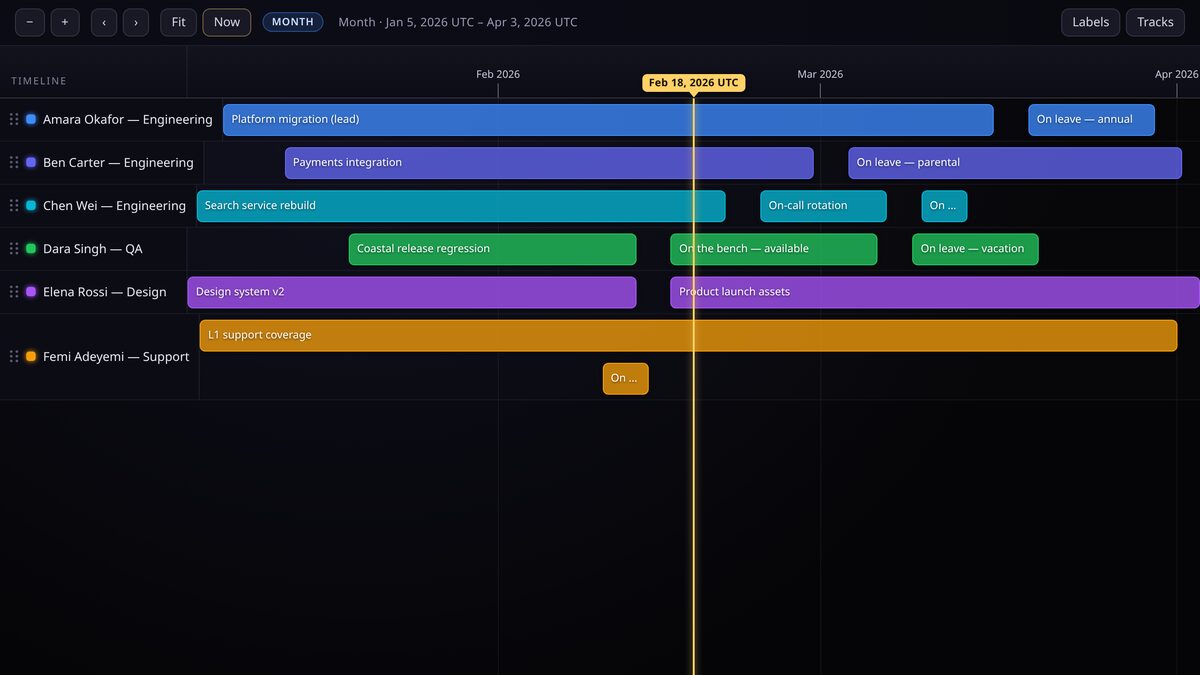
Resource planning is a scheduling problem, and schedules are timelines. Put each person on their own lane and the clashes that a calendar hides become obvious.
One track per person
Give every team member a track. Even a team of a dozen stays readable because the viewer packs and lazily loads by viewport rather than drawing everything at once.
Assignments and leave are ranges
Any block of time is a range at day precision: a project assignment, a training week, annual leave, parental leave, an on-call rotation. A single-day thing such as a public holiday is a point at day precision.
- Project assignment, range from kickoff to handover.
- Annual leave, range across the booked days.
- On-call rotation, range across the rotation, one track per rotation if you prefer.
- Public holiday, point event, or a range if you want it to read as a block.
Spot clashes before they bite
When two staff on the same project are both out in the same week, the overlap is visible immediately as two leave bars on adjacent lanes in the same columns. That is your coverage-gap alert, no formula required.
Add an importance level to critical assignments so they stand out when you zoom out to a quarter or a year.
Keep personal data private
Leave is personal data. Keep the timeline unlisted or protected with a PIN, and share it only with the managers who need it. Do not put a leave planner on a public URL.
Keep reading
For product teams
Run a whole product launch on one canvas
Development, code freeze, billing, permits and store approval on one timeline, so nothing blocks launch day by surprise.
Start here
How TimeStrands works
The one-page tour: what tracks, events and sources are, how deep time is stored, and the path from a blank canvas to an embed.