
Start here
How TimeStrands works
The one-page tour: what tracks, events and sources are, how deep time is stored, and the path from a blank canvas to an embed.
6 min read
What TimeStrands is
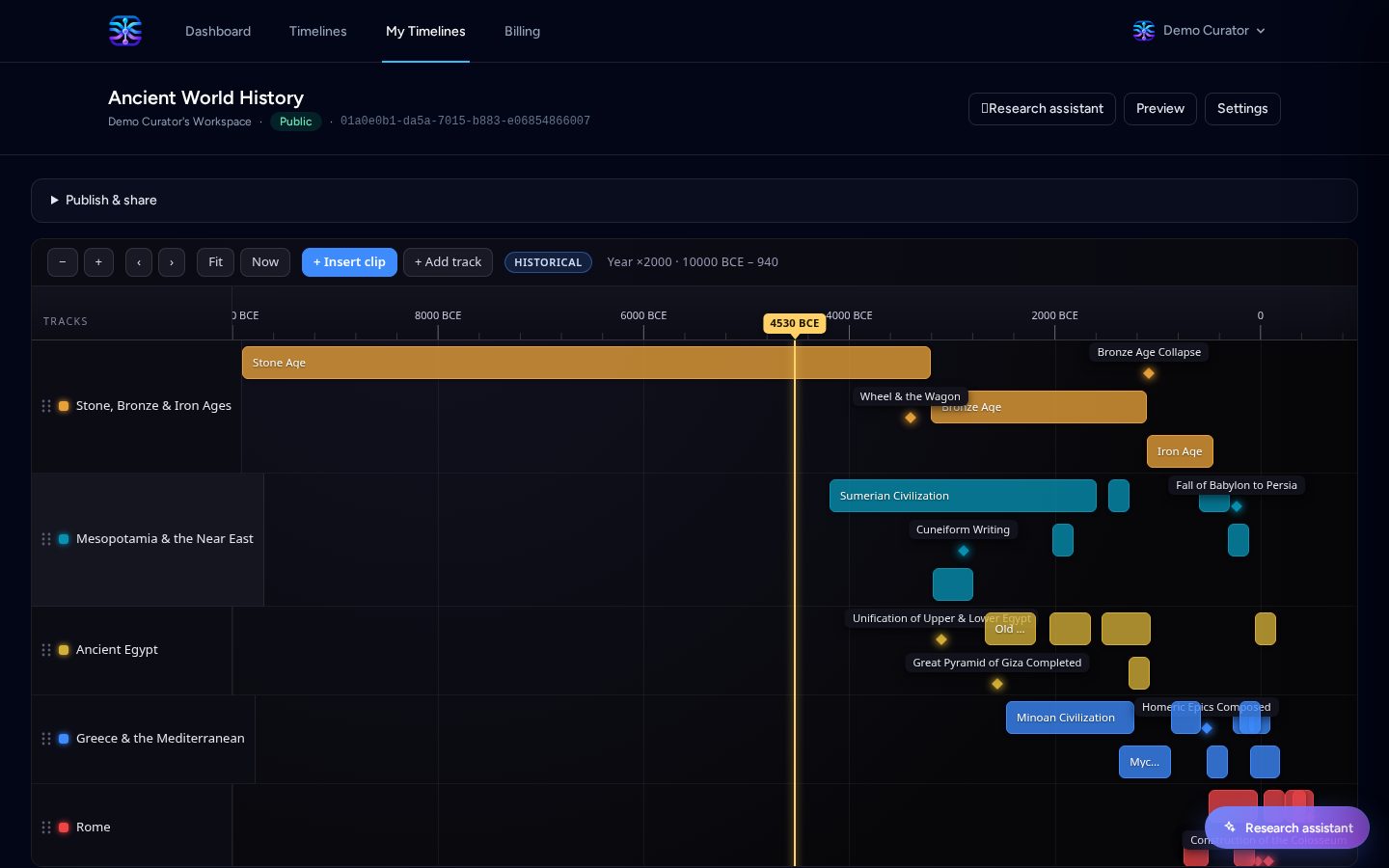
TimeStrands is an interactive timeline maker. You assemble a chronology once, publish it to a canonical URL, and embed it anywhere with a single line of HTML. It is built for stories that span deep time, from 10,000 BCE to the next quarter, without the spreadsheet hacks that break at the first negative year.
The three building blocks
Every timeline is built from just three things. Learn these and the rest is practice.
- Tracks are swimlanes. Give one to each actor, product line, franchise, person or theme, so parallel stories stay readable instead of colliding on one row.
- Events are the dated marks inside a track. An event is either a point (a single moment) or a range (a start and an end), at whatever precision the facts deserve.
- Sources are citations attached to an event: a URL, a title, a publisher and an access date. Provenance travels with the data through exports and remixes.
Time that behaves
Dates are stored as a single signed integer, so a timeline can run from the Stone Age to the future in one column. Negative numbers mean BCE: -3100 is 3100 BCE.
Every event also carries a precision: millennium, century, decade, era, year, month, day, or a clock unit (hour, minute, second, millisecond). A fuzzy fact is stored as fuzzy rather than rounded into a lie, and an approximate one adds a "circa" flag on top of its precision.
Point versus range: leave the end date empty for a moment (a battle, a launch), or set one for something that lasts (a reign, a support window, a marketing campaign).
Build your first timeline
- Create an account and open the dashboard. A personal organization is set up for you automatically.
- Create a timeline and give it a title and a summary. Nothing is public until you publish.
- Add a track for each story thread and give it a colour.
- Add events to each track. Choose the precision that matches the facts, add a source link, then reorder until the story reads cleanly.
- Preview as you go. The private preview uses the same viewer your audience will see.
Publish and embed
Publishing mints a globally unique public slug and a canonical URL. Public timelines are indexable and free forever; unlisted and protected (link plus PIN) timelines are part of the paid plans.
Every published timeline can also be embedded as a responsive iframe. Copy the snippet from the publish panel and drop it into your site, docs or LMS.
Embed snippet
<iframe src="https://timestrands.com/t/your-slug/embed" style="width:100%;height:520px;border:0" loading="lazy" title="Your timeline"></iframe>Research with an assistant
The authoring canvas ships with a research assistant. Give it a topic and it reads Wikipedia, then writes tracks and events straight into your timeline with sources attached. The same capability is available to external tools through the Model Context Protocol (MCP) server, so agents like Claude, opencode and Cursor can build alongside you.
Keep reading
For educators
Teach world history with BCE dates
Build a deep-time classroom timeline that runs from the Bronze Age to the Iron Age without a single spreadsheet hack.
For product managers
Compare product releases side by side
Put iPhone, Pixel and Galaxy launches on one competitive timeline, then swap in your own roadmap or changelog.
For cloud & security teams
Reconstruct an incident from a log stream
Drop CloudTrail records onto a timeline and zoom from the whole morning down to a millisecond-level burst of activity.