
For study & faith
Trace a life against its world
Use circa dates, ranges and parallel tracks to place one life beside the history happening around it.
7 min read
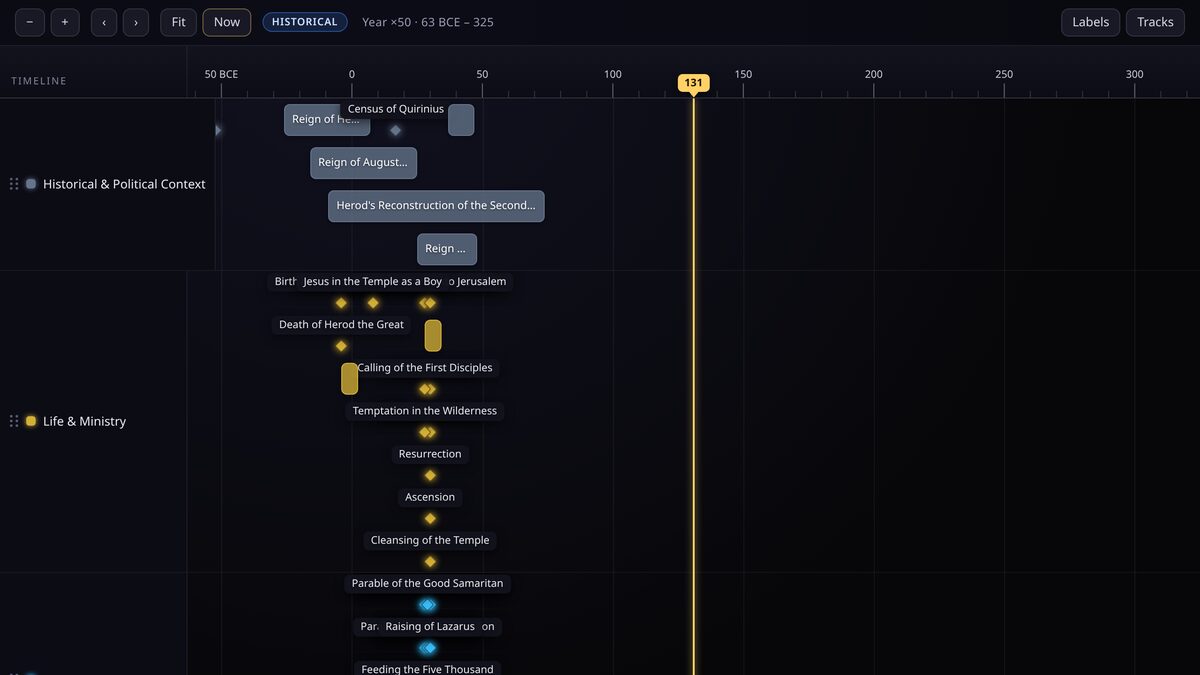
A biography becomes far more legible when it is read against the world it happened in. TimeStrands lets you keep both in view, and it is built for the fuzzy, source-dependent dating that historical and religious study demands.
Two axes from one dataset
Create a personal track for the life itself, and one or more world tracks for the rulers, empires and events around it. A birth on the personal track lines up, by date alone, with a census or a reign on the world track.
- Life and ministry, the personal track.
- Roman Empire and its provinces, a world track.
- Herodian dynasty and Judea, a second world track.
- Early church, a track that continues after the life ends.
Be honest with fuzzy dates
Ancient biographies rarely have exact dates, and the sources often disagree. Keep the precision low and the circa flag on: a birth around 4 BCE is a year with circa, not a day. Rounding a disputed date to a specific day invents certainty the evidence does not support.
Use a range for a period you can bound but not pin down, such as a ministry that runs for roughly three years.
Circa is a separate flag, not a precision. You can have a circa year, a circa decade or a circa century, and the label on the axis will reflect both.
Cite every claim
- Attach a source to each event: a translation, a study Bible, a scholarly article or an encyclopedia entry.
- Record the publisher and access date as well as the URL.
- Where scholars disagree, add both sources and let the disagreement stay visible.
Share it with a study group
Publish the timeline and share the canonical link, or embed it in a lesson page. Private study notes can stay in an unlisted timeline that only people with the link can open.
Keep reading
For educators
Teach world history with BCE dates
Build a deep-time classroom timeline that runs from the Bronze Age to the Iron Age without a single spreadsheet hack.
For fans & creators
Untangle franchises, prequels and spin-offs
One track per franchise, every release dated, and the in-universe order spelled out for readers.